Bitcoin for beginners / 10 min read
Bitcoin full nodes: what they do, costs and a safe setup plan
Learn what a Bitcoin full node verifies, how pruning works and what it costs. Plan installation, synchronization, wallet connections and basic maintenance.
Educational guide · Sources checked before publication
What running a Bitcoin node means
A Bitcoin full node is software that checks transactions and blocks against Bitcoin's consensus rules. It maintains a view of the valid chain and the information needed to evaluate new transactions. Bitcoin.org's node guide emphasizes validation as the defining function. Keeping every historical block permanently is a separate storage choice, which is why a pruned node can still be a fully validating node.
Running your own node can let compatible wallet software obtain blockchain information from a system you control. That reduces reliance on an outside service for the information that wallet actually requests through your node. The benefit depends on configuration: installing a node does not automatically redirect every wallet on your phone or computer to it.
This guide helps you decide whether a node fits your needs and plan an initial installation without depositing money. It focuses on verification, storage, operating costs and basic administration. A node is not an investment product, and Bitcoin does not pay a protocol reward simply for keeping ordinary full-node software online.
Distinguish a node, a miner and a wallet
A miner assembles candidate blocks and performs proof-of-work computation. A full node checks whether received blocks satisfy its rules. A wallet manages keys or coordinates signing and helps users construct and track payments. One installation can combine roles, but the roles are conceptually different. A Bitcoin Core installation can run as a node without holding valuable private keys.
A simple example illustrates the distinction. If a miner proposes a block with an invalid transaction, a properly functioning node applying the relevant rules rejects it. The miner's computing power does not make that invalid transaction valid to the node. Among competing valid chains, accumulated proof of work matters; counting how many computers advertise a chain is not Bitcoin's consensus mechanism.
Conversely, your node cannot force miners to include your payment promptly or guarantee that a transaction will never be reorganized out of a block. Independent validation improves your ability to check rules. It does not remove congestion, probabilistic confirmation risk or the need to protect wallet keys.
Archival storage, pruning and light clients
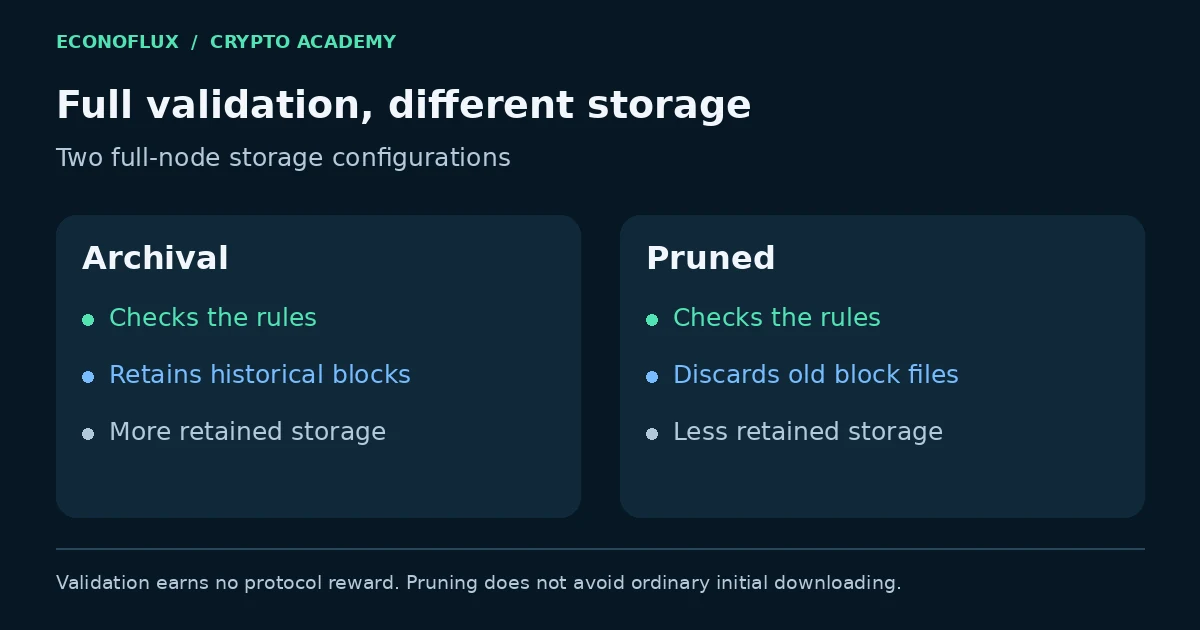
An archival configuration retains the historical block data it downloads. That is useful when applications need historical blocks or indexes and when the node serves older blocks to peers. A pruned configuration discards older block files after processing them, while retaining the state and recent data needed to continue validation. The exact disk requirements change as software and blockchain data evolve.
Pruning primarily saves retained storage. In an ordinary synchronization from the beginning, the node still needs to download and process historical data before removing old files. It therefore does not turn the initial download into a tiny transfer. Additional indexes and historical wallet rescans may have limitations or require recovering data, depending on configuration and software version.
A lightweight client is different. It relies on a more limited verification model or outside information rather than independently applying the same full validation process. The word “light” on a product page does not mean “pruned full node.” Ask which checks the software performs and which server supplies the information it displays.
Estimate costs using your own measurements
A small electricity calculation
Suppose a fictional node computer averages 15 watts and runs continuously for a 30-day month. Its electricity use is 15 ÷ 1,000 × 24 × 30 = 10.8 kWh. At an assumed tariff of 0.20 currency units per kWh, that costs 2.16 per month. If the average draw is 40 watts instead, consumption is 28.8 kWh and the same tariff produces a cost of 5.76.
These figures are examples, not hardware specifications or local electricity quotes. Initial synchronization may use more resources than steady operation. Include storage, replacement hardware, internet charges, cooling where relevant and your time. If you already own suitable equipment, distinguish additional electricity and wear from the full purchase price of a dedicated machine.
Bandwidth is a separate budget. Downloading history, receiving new data and serving peers all consume traffic. A pruned disk setting does not by itself cap network usage. Review your provider's data allowance and the current client's traffic controls before leaving the machine unattended. Budget for headroom instead of assuming a storage target equals the total size of the application and databases.
Prepare the installation before downloading
Start by writing down the purpose: learning, supplying data to your own wallet, supporting peer connectivity or providing historical data to an application. The purpose determines whether pruning, indexes and a particular connection method are appropriate. Check current Bitcoin Core release documentation for your operating system instead of copying an old hardware minimum or a command from an unrelated version.
Use a supported operating system, reliable storage and a stable power supply. Decide where the data directory will live and whether the machine can remain connected for the initial synchronization. On a shared computer, consider disk space, other users' access and the effect of heavy activity on everyday work.
Reach the official Bitcoin Core download site independently. Follow that release's verification instructions for checksums and signatures, including how to authenticate the relevant signing information. A checksum from the same untrusted download page does not independently establish who produced the file. If you cannot complete a verification step, resolve that uncertainty before using the installation for sensitive wallet activity.
First run and initial synchronization
During initial setup, select a data location with sufficient space and choose the storage mode that matches your plan. You can begin as a learning node without creating or importing a wallet containing funds. This keeps experimentation with networking and synchronization separate from control of valuable keys.
The client must catch up with the chain before its view is current. The interface may show synchronization progress, a recent block time or a remaining estimate. Estimates vary with hardware, network performance and the amount of work left. A progress bar moving slowly is not by itself evidence of a broken installation; repeated errors or an unchanged state deserve investigation through the client's logs and documentation.
An unsynchronized node can report incomplete wallet history or miss recent payments because it has not reached the relevant blocks. Do not interpret that state as proof that funds disappeared. Let the node finish, confirm that it remains connected and up to date, and only then test the intended wallet integration.
Connect a wallet without exposing administration interfaces
A node provides the most direct verification benefit to a wallet when that wallet is actually configured to use it. Some wallets integrate directly; others need compatible server software or a different connection method. Check the wallet's documentation for supported arrangements. Do not assume that entering a random public server address connects you to your own node.
Distinguish peer-to-peer networking from administrative access. Accepting peer connections can help relay data, but it is not the same as exposing the node's RPC administration interface. Keep administrative access restricted to trusted local access or a properly secured arrangement described in the software documentation. Do not open management ports to the public internet merely to make a phone wallet connect.
Running a node does not require a deposit, purchase of a “node license,” or disclosure of a recovery phrase to a website. Wallet support and node operation are separate matters. An offer promising fixed passive Bitcoin income for activating ordinary node software should not be confused with Bitcoin's actual reward rules.
Confirm that your setup is doing what you intended
Use the client's status and peer information to confirm that it has connections, has completed initial synchronization and continues receiving blocks. Compare a recent block height or hash with more than one public reference as a diagnostic check, while remembering that those references are not replacements for your node's validation. Temporary differences can occur because observations were made at different times.
Next, check the wallet's connection settings or status display. A node running in the background proves nothing about where a separate wallet obtains balances. When possible, use a read-only wallet configuration or non-sensitive test history to verify the integration before relying on it. Avoid importing secrets just to test whether a network connection works.
Finally, document the software version, storage mode, data location and access method. Record what would need to be reinstalled after a disk failure and what wallet information requires separate backup. Re-downloading blockchain data is different from recovering private keys; one is publicly obtainable, while lost key material may not be recoverable.
Maintenance, privacy and realistic limitations
Follow official release notes and plan updates deliberately. Stop the client cleanly before maintenance rather than cutting power during database writes. Watch free disk space, hardware errors and synchronization status. A machine that silently fills its disk or loses connectivity may remain powered on while no longer serving your intended purpose.
Using your own node can reduce disclosure of wallet queries to a third-party server. It does not make Bitcoin transactions anonymous. Transactions remain public, network connections can reveal information, and other wallet services may still contact external providers. Pruning is a storage option, not a privacy guarantee. Evaluate the complete wallet and network arrangement rather than a single setting.
A node also depends on its host's security. Malware, untrusted software and exposed administrative services can undermine the setup. Keeping keys in a separate signing device can separate some responsibilities, but it does not make every transaction request safe. Node verification, device security and transaction review solve different parts of the problem.
Decide whether a node is useful for you
A node is a reasonable learning project if you want to understand validation and can maintain the required resources. It may also serve a specific wallet-verification or data-access goal. The strongest plan names that goal, estimates costs, identifies the integration and defines how success will be checked.
If you need an always-available public service or extensive historical queries, a basic home setup may need additional infrastructure and administration. If your only expectation is automatic income, an ordinary Bitcoin full node does not provide that mechanism. Distinguish the educational and verification benefits from unrelated mining or paid service businesses.
Start with a documented, reversible configuration and no valuable keys. Add responsibilities only after understanding synchronization, storage and connectivity. This approach makes the first installation useful even if you later decide that another arrangement better fits your available time and equipment.
Frequently asked questions
Does running a Bitcoin full node earn BTC? The protocol does not reward ordinary full nodes simply for validating and relaying data. Mining and separately operated services have different mechanisms and costs.
Is a pruned node still a full node? Yes, when it performs full validation and discards old block files afterward. Full validation and permanent archival storage are different properties.
Do I need to buy bitcoin before starting? No. You can install and synchronize node software without depositing funds or importing a wallet with money. Verification and key ownership are separate functions.
Will pruning eliminate the initial blockchain download? Not in ordinary synchronization from the beginning. Historical data is still downloaded and processed; pruning reduces what remains stored afterward.
Can I switch the computer off? Yes, using a clean shutdown. It must catch up on missed blocks when restarted, and services depending on it are unavailable while it is offline. Downtime does not delete onchain coins.
Sources & further reading
Sources and methodology · Report a correction
For information only. Not financial advice.